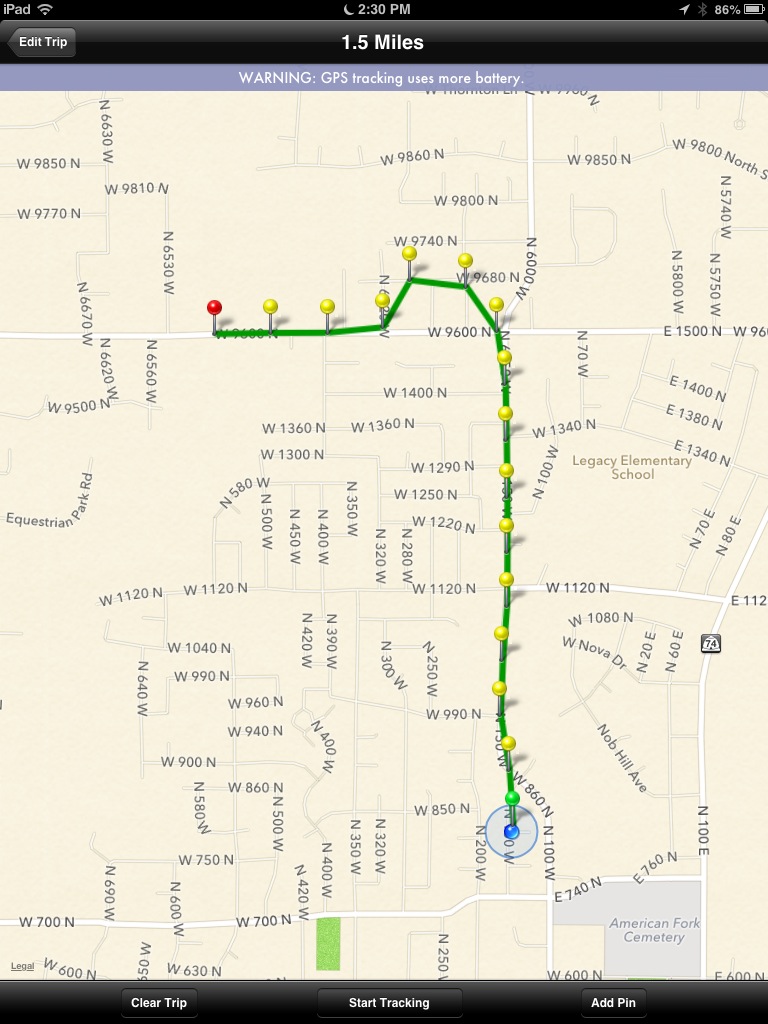
So many users have requested a version of MileBug for iPad. It only makes sense as many people now have iPads, but who may not have an iPhone or iPod Touch. While it's true that the iPhone version has worked for many people on the iPad via the 2x magnifier, having a UI that is optimized for the iPad will be a great improvement.
Last night MileBug was released as a Universal App, which means it can be installed on either an iPhone/iTouch or an iPad and it will detect which device it's running on...and present the right UI for the right screen! Buy once and use on both!
MileBug is a great mileage tracker for business deductible miles. Track miles by odometer readings and/or GPS. Trip miles are automatically converted to tax deductions and made available in reports fit for Word/Pages (html) and Excel/Numbers (CSV).
Check out some screenshots of MileBug on the iPad!
Buy MileBug for iPad in the Apple App Store!
Showing posts with label iPhone. Show all posts
Monday, March 25, 2013
Tuesday, April 24, 2012
Recommended Solution for White Icon on iOS
The full solution can be found on our new site at www.milebug.com.
Here's a direct link to the solution:
http://milebug.com/2012/04/24/white-icon-recommended-solution/
Here's a direct link to the solution:
http://milebug.com/2012/04/24/white-icon-recommended-solution/
Wednesday, April 4, 2012
Reviews of MileBug at The Daily App Show
MileBug was recently featured at The Daily App Show. Below are the video reviews for each of the platforms.


Wednesday, March 21, 2012
99c Spring Sale for iPhone and Android!
Welcome to Spring! What a great time for a fresh start! And with all the fun of doing your taxes either fresh on your mind or still pending in the Inbox, think of how much easier it will be next year with the MileBug reports capturing all your miles...when you start today!
So to help out, we're putting MileBug on sale for only 99c for the next 3 days. To be clear, this is only the iPhone and Android versions. The Windows Marketplace had a little slip-up and we couldn't get the price change done there in time. We'll try to make it up!
Only 99c through March 23rd - Get it now!
Labels:
android,
iOS,
iPhone,
itouch,
mile tracker,
mileage log,
new year,
sale,
spring,
track miles
Tuesday, March 20, 2012
Reports vs. Backups
Some people have written in about not being able to open the .mbdata backup file on their computer, so I thought to clarify the difference between Reports and Backups. This pertains to the iPhone version.
Backups
Under the Backup tab in MileBug, you can create a backup file of all your data. It stays on your phone until you email it to yourself or pull it off using iTunes File Sharing. There is a help guide to iTunes File Sharing at the bottom of the Backup tab. Just click "What is iTunes File Sharing?". The .mbdata file generated by the backup process is readable only by MileBug and is intended to be used to restore your data if you have problems with your iPhone or get a new iPhone.
Reports
Under the Reports tab, you can generate a human-readable report in either HTML or CSV (Excel or Numbers) format. You may choose the date range, the business(es), the vehicle(s), and the sort criteria. You can preview the report right in MileBug, too! Then hit Send, and the iPhone Email Composer will appear with your report as an attachment. After entering your email address, hit Send on the email composer and your report will arrive in your Inbox shortly.
Happy Taxes Everyone!
Backups
Under the Backup tab in MileBug, you can create a backup file of all your data. It stays on your phone until you email it to yourself or pull it off using iTunes File Sharing. There is a help guide to iTunes File Sharing at the bottom of the Backup tab. Just click "What is iTunes File Sharing?". The .mbdata file generated by the backup process is readable only by MileBug and is intended to be used to restore your data if you have problems with your iPhone or get a new iPhone.
Reports
Under the Reports tab, you can generate a human-readable report in either HTML or CSV (Excel or Numbers) format. You may choose the date range, the business(es), the vehicle(s), and the sort criteria. You can preview the report right in MileBug, too! Then hit Send, and the iPhone Email Composer will appear with your report as an attachment. After entering your email address, hit Send on the email composer and your report will arrive in your Inbox shortly.
Happy Taxes Everyone!
Labels:
backup,
backup tab,
data backup,
email,
iPhone,
iPhone 4S,
iTunes File Sharing,
mbdata,
report tab,
reports,
restore data
Monday, March 12, 2012
Save the trip to have GPS continue tracking
Remember: Save the newly added trip to have the GPS continue tracking.
Labels:
add trip,
beginners,
editing,
gps,
gps tracking,
iPhone,
iPhone 3G,
iPhone 4S,
mileage log,
mileage tracker
Tuesday, January 17, 2012
How to Remove MileBug Backups from your iPhone
An iPhone MileBug user wrote in asking if there was a way to remove old backup files from his iPhone. There certainly is, and such, I thought there may be others out there wondering the same questions.
WARNING: For either answer, DO NOT DELETE "appData.mbdata"
Short Answer: via iTunes File Sharing.
Step-by-step answer:
WARNING: For either answer, DO NOT DELETE "appData.mbdata"
Short Answer: via iTunes File Sharing.
Step-by-step answer:
1) Connect your iPhone to your computer, open iTunes, select your iPhone listed on the left
2) Choose "Apps" on the top and scroll down to "File Sharing"
3) Select MileBug and you'll see your backup files listed on the right
4) Select the files you wish to delete and hit "Delete" on your keyboard
5) DO NOT DELETE "appData.mbdata" as this is your current working database for MileBug
Don't be afraid to write-in with questions. We would love to help you, and more than likely there are others out there looking for the same answers.
Labels:
backup,
backups,
iPhone,
iTunes File Sharing,
milebug
Monday, January 2, 2012
Start the New Year right by tracking your trips!
Welcome to 2012! Even though it's potentially a few months before you start putting together your taxes for 2011, right now is the time to start your 2012 taxes the right way by tracking ALL your business miles, charity miles, and medical miles. And MileBug is here for you to do just that.
How does $1000 tax deduction sound?
The IRS left the very nice tax deduction rate for business miles at $0.555/mile. That's $5.55 for every 10 miles you drive your personal vehicle for business purposes. If you average 10 miles per trip, and 2 trips per week, that's over 1000 miles on the year for a very respectable tax deduction of over $550! If you drive more than a couple trips per week and they average more than 20-30 miles or more, then you're looking at well over a $1000 deduction. And who couldn't use that?
"Favorite Trips" make logging the short trips easy and thus profitable, too!
What about the little trips? The short trips to the supply store, or to the post office? Too much hassle? Not with MileBug. And the little trips add up, too. Set up a Favorite Trip for each of these common outings, and it's a quick few taps to log the trip. Two to three miles here, 3-4 miles there...and you have another hundred or more on your tax deduction.
MileBug on iOS (iPhone), Android, and very soon Windows Phone 7
Apple and Google have emerged as the giants in the mobile app world with iPhone apps and Android apps. MileBug is available for both. Microsoft is making great efforts to join the party with the new Windows Phone 7, and MileBug is almost there, too. It's been submitted...just awaits approval and release from the Microsoft powers that be. We're upgrading both iPhone and Android versions, too. So keep the feature requests coming!
Happy New Year everyone! Let's make it great!
How does $1000 tax deduction sound?
The IRS left the very nice tax deduction rate for business miles at $0.555/mile. That's $5.55 for every 10 miles you drive your personal vehicle for business purposes. If you average 10 miles per trip, and 2 trips per week, that's over 1000 miles on the year for a very respectable tax deduction of over $550! If you drive more than a couple trips per week and they average more than 20-30 miles or more, then you're looking at well over a $1000 deduction. And who couldn't use that?
"Favorite Trips" make logging the short trips easy and thus profitable, too!
What about the little trips? The short trips to the supply store, or to the post office? Too much hassle? Not with MileBug. And the little trips add up, too. Set up a Favorite Trip for each of these common outings, and it's a quick few taps to log the trip. Two to three miles here, 3-4 miles there...and you have another hundred or more on your tax deduction.
MileBug on iOS (iPhone), Android, and very soon Windows Phone 7
Apple and Google have emerged as the giants in the mobile app world with iPhone apps and Android apps. MileBug is available for both. Microsoft is making great efforts to join the party with the new Windows Phone 7, and MileBug is almost there, too. It's been submitted...just awaits approval and release from the Microsoft powers that be. We're upgrading both iPhone and Android versions, too. So keep the feature requests coming!
Happy New Year everyone! Let's make it great!
Labels:
android,
favorites,
iOS,
iPhone,
iPhone 4S,
IRS,
kilometers,
km,
new rates,
new year,
tax deduction,
tax rates,
taxes,
track miles,
Windows Phone
Tuesday, August 3, 2010
MileBug 1.5.3 for iPhone Now in App Store!
Dear MileBug Users and Fans!
I'm pleased to announce the arrival of MileBug 1.5.3 to the iPhone. This release brings:
1) iOS4 support
We've been working hard on an online backup/sync feature, so these support releases have been stretched out. But keep on the lookout as the online sync service is just around the corner!
Get it here: MileBug 1.5.3 in the iTunes App Store
Learn about it here: milebug.com
I'm pleased to announce the arrival of MileBug 1.5.3 to the iPhone. This release brings:
1) iOS4 support
a) fast app switching
b) cleans up the bugs with managing Presets
2) Adds decimal point to the number padb) cleans up the bugs with managing Presets
We've been working hard on an online backup/sync feature, so these support releases have been stretched out. But keep on the lookout as the online sync service is just around the corner!
Get it here: MileBug 1.5.3 in the iTunes App Store
Learn about it here: milebug.com
Labels:
backup,
data sync,
decimal point,
iOS4,
iPhone,
IRS,
milebug update,
taxes
Monday, February 8, 2010
First episode of iPhoneDevShow with MileBug Developer now posted
As mentioned in a previous post, I was invited as one of two guests on the inaugural episode of the iPhoneDevShow by TheDailyAppShow last month. The video of that show is now on the site:
iPhoneDevShow: Episode 1 (26 January 2010)
http://thedigitallifestyle.tv/home/2010/2/3/behind-the-apps-google-courting-iphone-devs-for-android.html
iPhoneDevShow: Episode 1 (26 January 2010)
http://thedigitallifestyle.tv/home/2010/2/3/behind-the-apps-google-courting-iphone-devs-for-android.html
Labels:
interview,
iPhone,
iphonedevshow,
matchtunes,
milebug
Tuesday, December 29, 2009
24-Hour Time and Time Format
You can have 24-hour time in MileBug!
MileBug uses the settings specified in the iPhone/iPod device settings. To change to 24-hour time, open the Settings app on your iPhone home screen. Tap General --> Date&Time, then turn on 24-hour time. Next time you open MileBug...voila! 24-hour time!
As far as format, you can set the format in the Settings app as well. Tap General --> International --> Region Format. Then select your desired region.
MileBug uses the settings specified in the iPhone/iPod device settings. To change to 24-hour time, open the Settings app on your iPhone home screen. Tap General --> Date&Time, then turn on 24-hour time. Next time you open MileBug...voila! 24-hour time!
As far as format, you can set the format in the Settings app as well. Tap General --> International --> Region Format. Then select your desired region.
Thursday, October 1, 2009
FALL SALE - 50% OFF!!
To celebrate the changing of the leaves, we're changing the price...for a limited time! MileBug full version is now just $1.99. That's 50% off the normal price of $3.99.
So go get MileBug now: itunes.com/apps/milebug
Labels:
iPhone,
iPhone 3G,
iPhone 3GS,
IRS,
mileage tracker,
sale,
track miles
Friday, July 3, 2009
MileBug 1.4 just released for iPhone and iPod Touch
The wait is over! MileBug 1.4, with support for iPhone OS 3.0, has been approved by Apple and is now available in the App Store. For existing customers, updates are free as always. If you're not yet a MileBug user, you can easily become one for only $3.99.
Here's the link: itunes.com/apps/milebug
What's in the new update?
1) Support for iPhone OS 3.0
2) Blog access
3) Tell a Friend
4) New About Screen
5) New icon for MileBug Lite (really nice!)
6) BUG FIX: 24-hour setting was preventing times later than 11:59
Enjoy!
Here's the link: itunes.com/apps/milebug
What's in the new update?
1) Support for iPhone OS 3.0
2) Blog access
3) Tell a Friend
4) New About Screen
5) New icon for MileBug Lite (really nice!)
6) BUG FIX: 24-hour setting was preventing times later than 11:59
Enjoy!
Labels:
3GS,
iPhone,
ipod touch,
IRS,
mileage log,
milebug update,
taxes
Tuesday, May 5, 2009
MileBug Pre-Update Sale: 50% OFF
While we wait for version 1.4 to make an appearance, MileBug is on sale for 50% OFF! That makes it just $1.99 for a limited time. Realtors, direct sales, small business, big business, Mary Kay, NuSkin, entrepreneurs, and everyone else who needs to track their mile...now's the time to get MileBug! Enjoy!
Monday, April 6, 2009
Video Review of MileBug on TheDigitalLifestyle.TV
Great news! Ryan Ritchey of TheDigitalLifestyle.TV has done a video review of MileBug. Just check out the link below:
http://tinyurl.com/milebug-video
Labels:
app review,
iPhone,
mileage log,
milebug,
thedigitallifestyle
Thursday, March 26, 2009
Reports: Copy/Paste for Mac users best with Office 2004 or newer
Working with a customer, we determined that copying and pasting the emailed reports will work properly if the user either has Windows Office 2000 or newer, or Mac Office 2004 or newer.
Older versions result in all the data in one column in Excel or a running sentence/paragraph in Word.
Labels:
copy/paste,
iPhone,
mac office,
mileage log,
milebug,
reports
Saturday, March 21, 2009
UPDATE: MileBug 1.3 is HERE!
Here it is! Update 1.3! Here's what's new:
1) Origin or Start Location
2) International currency support
3) Grand total km/miles and deduction across businesses
4) Display vehicle in trip list
5) Additional instructions on key screens
6) Localized to Swedish
7) Bug fix - Swedish support on dates in report
ENJOY!!
1) Origin or Start Location
2) International currency support
3) Grand total km/miles and deduction across businesses
4) Display vehicle in trip list
5) Additional instructions on key screens
6) Localized to Swedish
7) Bug fix - Swedish support on dates in report
ENJOY!!
Labels:
iPhone,
ipod touch,
izatt,
mileage log,
milebug,
milebug update
Wednesday, February 4, 2009
Editing Destinations and Purposes
It seems there's some confusion on how to edit, delete, and reorder destinations and purposes. So here's another blog post to help you out.
Simply select Businesses in the Presets. Then select the business that has the destinations and purposes you want to edit. You'll then be able to edit the business name and type/rate, as well as edit/delete/reorder the destinations and purposes for that business. It's that easy!
Also see the earlier post: Reordering Presets: A hidden feature
Simply select Businesses in the Presets. Then select the business that has the destinations and purposes you want to edit. You'll then be able to edit the business name and type/rate, as well as edit/delete/reorder the destinations and purposes for that business. It's that easy!
Also see the earlier post: Reordering Presets: A hidden feature
UPDATE: MileBug 1.2.1 now released!
We're pleased to announce the release of MileBug 1.2.1!
What's new in 1.2.1?
1) Sorting options for reports
2) Preview report before sending
3) Default U.S. IRS tax rates for 2009
4) Instructions for km/miles option
Now available in the App Store!
What's new in 1.2.1?
1) Sorting options for reports
2) Preview report before sending
3) Default U.S. IRS tax rates for 2009
4) Instructions for km/miles option
Now available in the App Store!
Labels:
App Store,
iPhone,
mileage log,
milebug update,
tax deduction
Monday, December 15, 2008
New IRS Rates: Effective January 1, 2009
The IRS has issued its new tax deduction rates for 2009. Come January 1st, please email yourselves a full report of your 2008 trips, and then clean out the Trips List. Then change the rates for your businesses/charities/medical/other categories to the following:
Business: $.55/mile
Charity: $.14/mile
Medical: $.24/mile
Business: $.55/mile
Charity: $.14/mile
Medical: $.24/mile
Subscribe to:
Posts (Atom)