Showing posts with label milebug update. Show all posts

Thursday, March 15, 2012

MileBug for WP7 hits #4 in Business!

With just over 2 months in the Windows Marketplace, MileBug for Windows Phone (WP7) hits #4 in the Business category! And to top it off, it has a 4.5-star rating! Thank you everybody!

Please leave reviews so we know what you like and what we can improve. Spread the word!


Wednesday, November 23, 2011

IRS 2012 Mileage Rates Will Be Announced in December

Every year the IRS updates the rates at which we can take a deduction for miles driven for business, charity, or medical reasons. Typically these rates are announced in early December. So hang on for another couple weeks and we'll have those for you.

We will also publish new versions of MileBug for all platforms that incorporate these new rates. Look for that update and you'll good to go with plenty of time before the New Year.

Happy Thanksgiving, Everyone!

Thursday, November 17, 2011

More Feature Requests - Need More!

OK, so we've heard from some of you. Let's hear more. As it stands, the list of desired new features is as follows, sorted by most requested:

1) Select from Contacts when add new trip
2) End date/time
3) iPad Version
4) Multiple destinations per trip
5) Add person's name to the reports
6) Backup to iCloud

Please comment below or send in your votes and requests via the Contact Us form above.

This goes for all you Android users out there, too!

Friday, October 28, 2011

Transfer Data from Lite to Full


Thanks for upgrading! You're really going to enjoy the GPS tracking. 

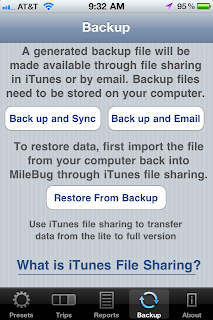
So let's get your data moved over from Lite so you're good to go. The short answer is that there's a tutorial inside MileBug on the Backup tab at the bottom. Just click "What is iTunes File Sharing?", and then click "How to use File Sharing with MileBug". (see screenshots to the right and below)

Here's some detailed steps to help you with this simple process:

FIRST: Backup MileBug Lite Data to Your Computer
1) Open MileBug Lite and select the Backup tab at the bottom
2) Tap the "Back up and Sync" button
3) Connect your iPhone to your computer and move the backup data file to your computer using iTunes File Sharing (see the tutorial inside MileBug mentioned above - screenshot below)

THEN: Load Lite Data file into full version of MileBug
1) Use iTunes File Sharing to put your Lite data backup file into the full version of MileBug
2) Launch MileBug (full) on your iPhone.
3) Select "Restore From Backup"
4) Choose the backup file in the picker from step 1 (probably only one there)
5) Tap "Restore Data"

That's it! Remember, the iTunes File Sharing is how you can always make a backup of your MileBug data. We recommend doing this on a monthly basis, and always doing it before you upgrade either the iOS or MileBug.


^
Friday, December 10, 2010

MileBug Featured at MacCreate

Just got notice from Joanne Carter at MacCreate that MileBug has been listed as part of their Daily iPhone App Digest - 9 December 2010. She notes in there that MileBug rose to #2 last January in the Finance category..let's do it again!

http://iphone.maccreate.com/2010/12/09/daily-iphone-app-digest-9-december-2010/

Thursday, November 25, 2010

Odometer Fix submitted to Apple

Thank you all for making us aware of the odometer bug when upgrading to iOS 4.2.1. We have fixed the problem and submitted an update for Apple's review. This new release was submitted on Tuesday, November 23rd, and we anticipate it being available via the App Store by the end of next week.

WORK-AROUND: In the meantime, you can safely use the Number Pad option for data entry in lieu of the odometer picker. Select the Presets Tab at the bottom, choose Settings, and select Number Pad for the data entry.

Our apologies for the inconvenience.

FYI, this release also includes the option of HTML or CSV reports. And the reports will be email attachments so greater amounts of data can be exported in the report.

Friday, August 20, 2010

MileBug 1.5.4 corrects bugs in 1.5.3

A new release of MileBug for iPhone is now available in the App Store! This release, 1.5.4, corrects the issue with setting the time when adding a trip and adds overall greater stability.

This is a free update, as all updates are. Simply open the App Store, choose Updates, and download the free MileBug update.

http://itunes.com/apps/milebug

Tuesday, August 3, 2010

MileBug 1.5.3 for iPhone Now in App Store!

Dear MileBug Users and Fans!

I'm pleased to announce the arrival of MileBug 1.5.3 to the iPhone. This release brings:
1) iOS4 support
a) fast app switching
b) cleans up the bugs with managing Presets
2) Adds decimal point to the number pad

We've been working hard on an online backup/sync feature, so these support releases have been stretched out. But keep on the lookout as the online sync service is just around the corner!

Get it here: MileBug 1.5.3 in the iTunes App Store
Learn about it here: milebug.com

Saturday, July 18, 2009

MileBug 1.4.1 is HERE!

A quick little update to fix a bug. With the upgrade to iPhone OS 3.0, users were reporting the inability to email the report from the Preview screen. All fixed!

Friday, July 3, 2009

MileBug 1.4 just released for iPhone and iPod Touch

The wait is over! MileBug 1.4, with support for iPhone OS 3.0, has been approved by Apple and is now available in the App Store. For existing customers, updates are free as always. If you're not yet a MileBug user, you can easily become one for only $3.99.

Here's the link: itunes.com/apps/milebug

What's in the new update?
1) Support for iPhone OS 3.0
2) Blog access
3) Tell a Friend
4) New About Screen
5) New icon for MileBug Lite (really nice!)
6) BUG FIX: 24-hour setting was preventing times later than 11:59

Enjoy!

Saturday, March 21, 2009

UPDATE: MileBug 1.3 is HERE!

Here it is! Update 1.3! Here's what's new:

1) Origin or Start Location
2) International currency support
3) Grand total km/miles and deduction across businesses
4) Display vehicle in trip list
5) Additional instructions on key screens
6) Localized to Swedish
7) Bug fix - Swedish support on dates in report

ENJOY!!

Wednesday, February 4, 2009

UPDATE: MileBug 1.2.1 now released!

We're pleased to announce the release of MileBug 1.2.1!

What's new in 1.2.1?
1) Sorting options for reports
2) Preview report before sending
3) Default U.S. IRS tax rates for 2009
4) Instructions for km/miles option

Now available in the App Store!

Thursday, October 23, 2008

Using Kilometers: Accessing your iPhone Settings

Basically, Apple has designated the iPhone/iPod Touch General Settings as the place to make "set once" choices that affect the behavior of an application. This is where the kilometers/miles setting can be found.

On the home screen, there is an icon labeled "Settings" that is gray and looks like a gear. Open "Settings" and scroll to the bottom of the screen. There you will see a selection for each application you have installed that has "set once" choices. MileBug will be listed, and by selecting it, you will find the following options:

1) Open To: (Trips List or Add Trip)
2) Measurement: (Kilometers or Miles)

So to use kilometers, simply select kilometers for the Measurement setting and return to MileBug.

$ Amounts Don't Show after Update!

No, you're not doing anything wrong. The data model changed in the update so you just need to reset your Type/Rate for each of your businesses. Here's what you do:

1) Change the rate on the business/charity/etc Type/Rate to something else and save it. Click "Change" if prompted.
2) Create a new TypeRate with the rate set to .585 (or the rate you want), keeping the old Type/Rate at some other value. Save.
3) Go into Businesses and select the new Type/Rate for each of your businesses/charities/etc. Save.

That should do it!