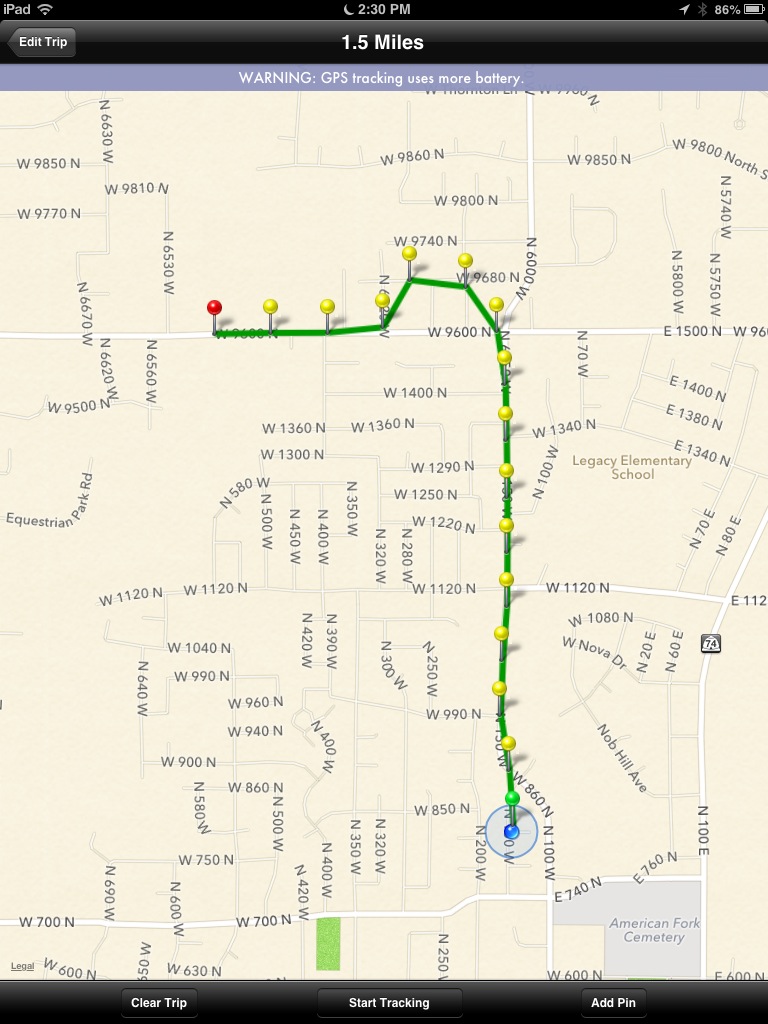
So many users have requested a version of MileBug for iPad. It only makes sense as many people now have iPads, but who may not have an iPhone or iPod Touch. While it's true that the iPhone version has worked for many people on the iPad via the 2x magnifier, having a UI that is optimized for the iPad will be a great improvement.
Last night MileBug was released as a Universal App, which means it can be installed on either an iPhone/iTouch or an iPad and it will detect which device it's running on...and present the right UI for the right screen! Buy once and use on both!
MileBug is a great mileage tracker for business deductible miles. Track miles by odometer readings and/or GPS. Trip miles are automatically converted to tax deductions and made available in reports fit for Word/Pages (html) and Excel/Numbers (CSV).
Check out some screenshots of MileBug on the iPad!
Buy MileBug for iPad in the Apple App Store!
Showing posts with label gps tracking. Show all posts
Monday, March 25, 2013
Monday, March 12, 2012
Save the trip to have GPS continue tracking
Remember: Save the newly added trip to have the GPS continue tracking.
Labels:
add trip,
beginners,
editing,
gps,
gps tracking,
iPhone,
iPhone 3G,
iPhone 4S,
mileage log,
mileage tracker
Thursday, November 17, 2011
More Feature Requests - Need More!
OK, so we've heard from some of you. Let's hear more. As it stands, the list of desired new features is as follows, sorted by most requested:
1) Select from Contacts when add new trip
2) End date/time
3) iPad Version
4) Multiple destinations per trip
5) Add person's name to the reports
6) Backup to iCloud
Please comment below or send in your votes and requests via the Contact Us form above.
This goes for all you Android users out there, too!
1) Select from Contacts when add new trip
2) End date/time
3) iPad Version
4) Multiple destinations per trip
5) Add person's name to the reports
6) Backup to iCloud
Please comment below or send in your votes and requests via the Contact Us form above.
This goes for all you Android users out there, too!
Labels:
features,
gps tracking,
icloud,
ipad,
milebug,
milebug update,
requests,
track miles
Saturday, June 11, 2011
MileBug 2.1 - GPS Full Path Tracking with Map Display
Last night MileBug 2.1 hit the App Store with the most exciting feature of the year - GPS Full Path tracking with Map Display. Ever since Apple allowed apps to run in the background, users have been requesting full GPS tracking. Now it's here - http://bit.ly/MileBug!
When adding a new trip, select "GPS Tracking" under the odometer readings on the Add Trip screen. This will slide on a Map View and show your current location. Simply tap "Start Tracking" and MileBug will drop a pin every time you move more than 1/10 mile. You can return to Add Trip and fill in the rest of the information, save it, and even leave MileBug to open other apps. As long as MileBug is running in the background (which it does by default), it's tracking your trip.
At any time, you can open the Trip and return to GPS Tracking and see your path on the map. Your path is drawn on the map, with dragable pins every 1/10 mile. To edit your path, you can drag pins around, remove pins, even add new pins. If you happen to forget to turn off GPS tracking when you arrive at your destination, you can easily trim your path to the correct pin when you do remember.
Full Path GPS Tracking is in the full version only. MileBug Lite GPS is only "as the crow flies" and does not include map display.
Please let us know in the comments below how it's working for you and suggestions on improvement, or even new features for our next release.
MileBug in the App Store - http://bit.ly/MileBug
When adding a new trip, select "GPS Tracking" under the odometer readings on the Add Trip screen. This will slide on a Map View and show your current location. Simply tap "Start Tracking" and MileBug will drop a pin every time you move more than 1/10 mile. You can return to Add Trip and fill in the rest of the information, save it, and even leave MileBug to open other apps. As long as MileBug is running in the background (which it does by default), it's tracking your trip.
At any time, you can open the Trip and return to GPS Tracking and see your path on the map. Your path is drawn on the map, with dragable pins every 1/10 mile. To edit your path, you can drag pins around, remove pins, even add new pins. If you happen to forget to turn off GPS tracking when you arrive at your destination, you can easily trim your path to the correct pin when you do remember.
Full Path GPS Tracking is in the full version only. MileBug Lite GPS is only "as the crow flies" and does not include map display.
Please let us know in the comments below how it's working for you and suggestions on improvement, or even new features for our next release.
MileBug in the App Store - http://bit.ly/MileBug
Labels:
gps,
gps tracking,
lite vs full,
map,
mileage log,
milebug
Subscribe to:
Posts (Atom)